Stop scheduling time to study.
Start studying the time you already have.
AlwaysOnTop FlashCards hovers over your desktop — above your game, your video, your work — quietly cycling through cards while you do something else.
No installation required · Single executable · Windows · About download warnings
You already have the time. You just haven’t been using it.
You know spaced repetition works. You probably have an Anki deck, a Quizlet set, or a vocabulary list sitting somewhere. The problem isn’t the tool — it’s that studying demands a dedicated block of focus that dead time never gets backfilled into.
AlwaysOnTop FlashCards doesn’t ask for a dedicated study session. It floats above your screen, advances through flashcards on a timer, and lets your brain absorb content during the time that was already going nowhere: grinding in a game, re-watching a show, waiting for something to load.
Most study apps compete with each other. AlwaysOnTop FlashCards competes with the podcast you’d otherwise have playing in the background. And it can run alongside that podcast.
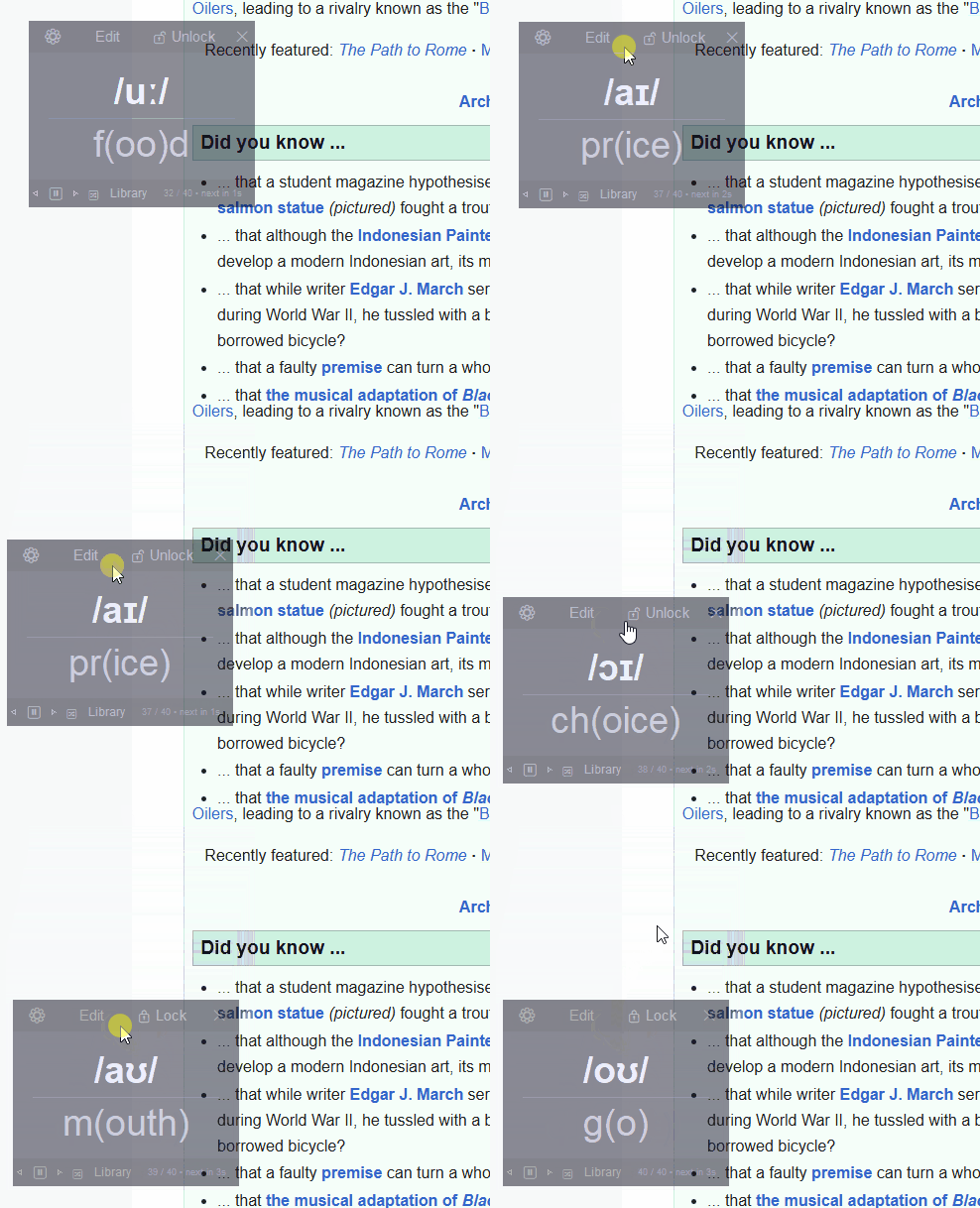
Running in the background while you do something else. That’s the whole idea.
The free version does the whole job.
We didn’t cut the core experience to push you toward paid. Download it, use it, and see if ambient learning actually works for you — before you spend a dollar.
- Always-on-top transparent overlay — stays visible above every other window, at whatever opacity you set
- Auto-advances on a timer — cycles through cards every few seconds without you touching anything
- Drag anywhere — park it in a corner, along an edge, wherever it’s least disruptive
- Edit cards in-app — add, update, and delete without leaving the overlay
- Pause, skip, rewind — full playback controls when you need them
- Live countdown — always know when the next card is coming
- Lock mode — freezes controls so you don’t accidentally skip cards
- Full keyboard support — Space/→ next, ← back, P pause, Q/Esc quit
- LaTeX / math notation — works for technical subjects, not just vocab
- Single executable, no installation — download and run
Free version supports 1 library.
Pro adds the things that matter once you’re hooked.
Once the free version has proven itself, Pro scales it up.
- Multiple libraries — switch between card sets instantly. Language vocab, certification prep, anatomy terms — keep them separate and swap on the fly.
- Import from CSV or TXT — load hundreds of cards in seconds instead of typing them in
- Adjustable settings — opacity, speed, theme, text size; everything the free version locks in place
- Per-library settings — each subject remembers its own preferences
- Shuffle mode — break the predictable order so you’re actually recalling, not pattern-matching
- Active recall mode — shows one side, waits, then reveals the answer. The difference between passively seeing cards and genuinely testing yourself.
- Hide cards — permanently remove a card from rotation without deleting it. For when you’ve learned something and don’t need to see it anymore — but can always bring it back.
- Flexible CSV import — import files with multiple columns and choose which ones map to front and back. Works with exports from Anki, spreadsheets, or any structured vocab list.
- Progress stats — cards viewed, session time, pacing
Active recall mode is the one feature that upgrades this from ambient re-exposure to genuine studying. If you’re serious about retention — for a language exam, a certification, anything with a deadline — this is the one that earns the price.
Simple pricing. No subscription.
$0
forever
- Always-on-top transparent overlay, drag anywhere
- Auto-advance timer with pause, skip & rewind
- In-app card editing
- Lock mode & full keyboard shortcuts
- LaTeX / math notation
- Single executable, no installation
- 1 library
Launch week — then $25
- Everything in free
- Unlimited libraries
- CSV / TXT import — including multi-column files; choose which columns map to front and back
- Adjustable settings (opacity, speed, theme, text size)
- Per-library settings
- Shuffle + active recall modes
- Hide cards — retire a card from rotation without deleting it
- Progress stats
One-time purchase. No subscription.
Worried about spending money on an unknown app? Start with the free version. It proves the concept — the paid version just extends it.
FAQ
It isn’t trying to be. Anki is excellent at what it does — if you have 45 minutes to sit and study, Anki is probably the better tool. AlwaysOnTop FlashCards isn’t competing with Anki. It’s doing something different: turning time you were already spending on something passive into time that’s also quietly productive. Most people who use AlwaysOnTop FlashCards already use Anki or a similar tool. They’re not replacing it.
You control where it sits and how transparent it is. In practice, most people drag it to a corner and forget it’s there — until the next card flips and something sticks.
Anything you can put on a flashcard: vocabulary, exam prep, certifications, terminology, historical dates, math formulas, anatomy, coding syntax. The tool is general-purpose.
Yes — that’s actually why it was built. The creator was in the middle of a game, wishing passive learning was happening in the background. That’s the problem AlwaysOnTop FlashCards exists to solve.
No. The free version is a single executable — download and run.
Yes. New software that isn’t code-signed gets flagged in two places: your browser may warn at download, and Windows may warn on first run. Both are statements about the file’s age and certificate, not its contents. Signing as an individual developer rather than a registered company means going through an identity verification process, which is in progress. In the meantime, choose to keep the file in your browser, then click “More info” and “Run anyway” in Windows. Both warnings fade as more people download it, and disappear entirely once signing is finished.
Get the IPA reference pack free.
Cross-linguistic phonetic guide, delivered instantly. Plus get notified when new packs drop.
No spam. Just the pack and occasional updates when new lists are released.
The time is already there. You’re just not using it.
Download the free version and run it for a week. If it changes how you think about dead time, you’ll know.